Amazon’s New Kindle Scribe Lineup
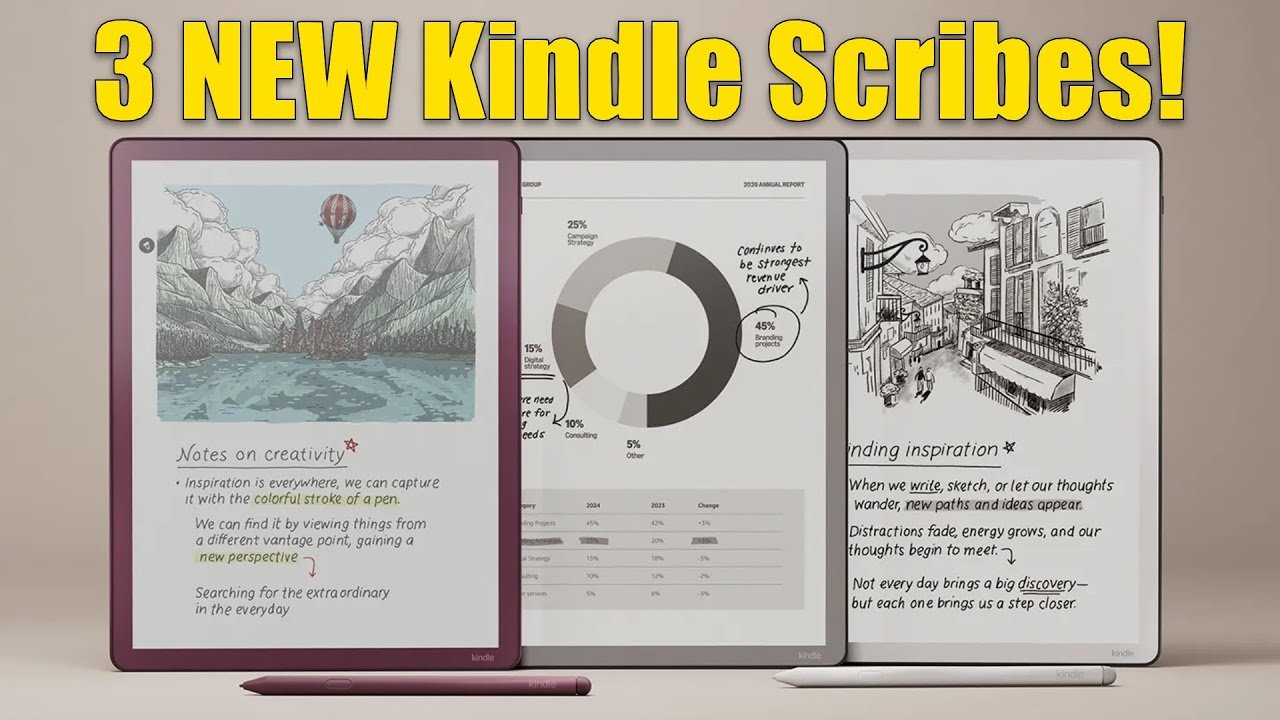
Amazon has finally pulled the curtain back on its refreshed Kindle Scribe range. For the first time, we now have three distinct models, including a long-rumoured colour option. The lineup is thinner, lighter, faster, and clearly moving away from the bulky side-chin design of old. Here’s what’s new and how these devices compare.
Three Models, Three Price Points
Amazon has split the Scribe range into three tiers:
Entry model – no front light, designed for people who mainly write and don’t need illumination.
Standard Scribe – adds an adjustable front light for reading day or night.
Kindle Scribe Colorsoft – Amazon’s first colour Scribe, with highlights and annotations standing out in a way grayscale never could.
All three share the same redesigned 11-inch body, now just 5.4 mm thick and weighing around 400 g. Bezels are even all the way around, a cleaner look than before. You can pick graphite for the traditional look, or “fig,” a subtle purple.
A Better Writing Experience
The Scribe has always been about note-taking, and Amazon has doubled down here.
A new quick-note space on the home screen lets you jot ideas instantly.
AI tools can now search your notebooks, summarise up to 15 pages, and even neaten your handwriting into tidy script.
Active Canvas returns for margin notes and PDF markup, while the Colorsoft Scribe introduces 10 pen colours, five highlighter shades, and a shading tool for sketching and structure.
A textured surface now offers more resistance, edging the experience closer to pen-on-paper.
Colour, Without the Distraction
The Colorsoft Scribe is the star here. Its 150 PPI colour layer won’t rival tablet saturation, but colour PDFs, diagrams, and highlighted textbooks will finally feel alive. Text remains razor-sharp at 300 PPI.
As ever, these are still Kindles, not tablets—designed to minimise distraction and keep focus on reading and writing.
Easier Workflow Integration
File handling has improved too. You can pull in documents from Google Drive or OneDrive, mark them up, and send them back as PDFs. Notes still sync to the Kindle app across devices, with OneNote and Alexa Plus integration promised soon.
Reading Features Get Smarter
Beyond note-taking, Amazon has added two new reading features that work across the Kindle platform:
Story So Far – a spoiler-free recap of earlier chapters, handy if you’ve been away from a book for a while.
Ask This Book – highlight a passage and ask a question, with AI pulling the answer directly from the text.
Specs, Battery, and Storage
Battery life is still measured in weeks rather than hours. Amazon quotes up to 7 weeks of reading or 2 weeks of writing, based on half an hour per day. A full charge takes under 2.5 hours with a 20 W USB-C charger. Storage options are 32 or 64 GB, with support for Kindle books, EPUBs, PDFs, Word documents, and more.
The Colorsoft gets a new quad-core processor for extra speed, though Amazon hasn’t gone into full technical detail.
Pricing and Availability
In the US, pricing is set at:
$429 for the non-front-lit model
$499 for the standard front-lit version
$629 for the Colorsoft
Launch is expected in November. In the UK and other regions, all three models will follow early next year.
Final Thoughts
Amazon’s strategy is clearer than ever: one device for pure writing, one for classic reading plus notes, and one for those who want colour as well. Whether the Colorsoft’s higher price is justified will depend on how much you value colour for diagrams, textbooks, and mark-ups.
I’ll be reviewing the Kindle Scribe Colorsoft in full when it finally arrives in the UK. Until then, I’d love to know—which one would you choose?
*This video was originally uploaded to my YouTube channel on the 1st September 2025 - LINK
Please support my work and enable me to keep writing content like this by tapping here: BuyMeACoffee