This iPad Keyboard Case Just Replaced My USB-C Hub!
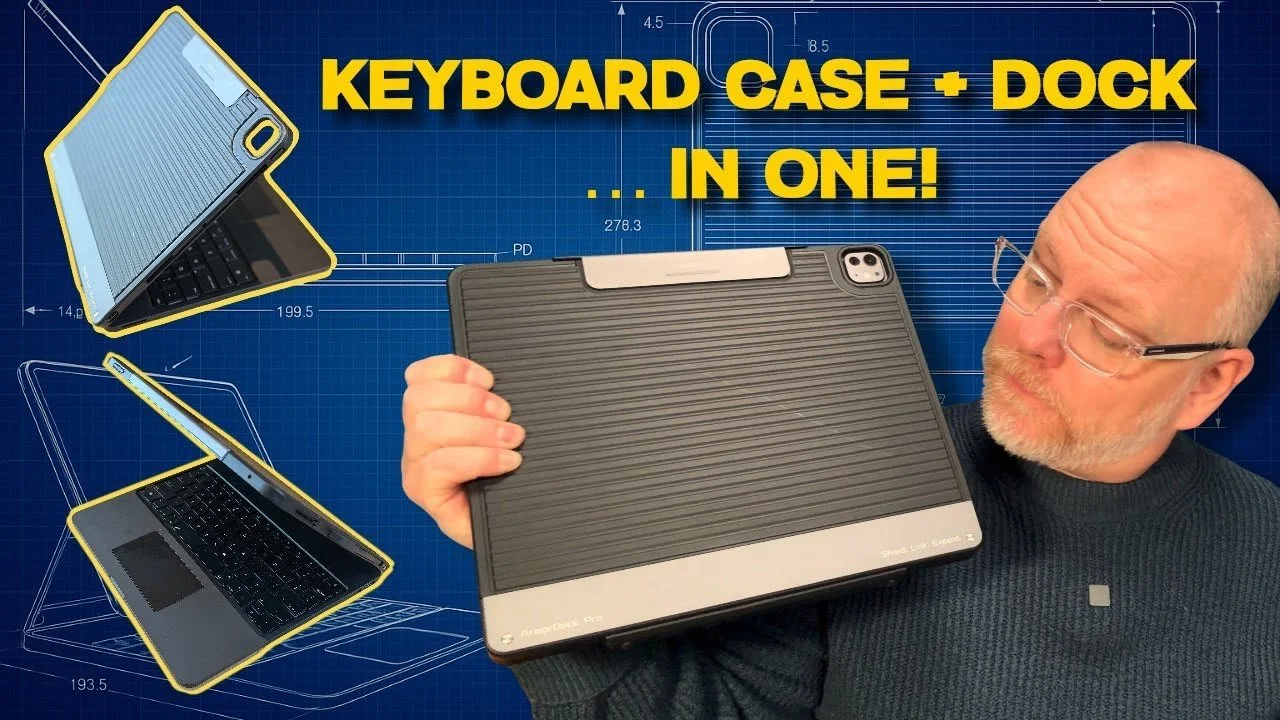
I wasn’t planning to cover another iPad keyboard case. I’ve reviewed plenty, and most of them blur into the same basic idea with a different logo stamped on the back. But this one has a little “je ne sais quoi” about it. Yes, it’s a keyboard case, but it’s also a full docking station, complete with HDMI, SSD expansion, an SD card reader, and power delivery pass-through charging.
This keyboard case is question is the Chesona ArmorDock Pro, and if nothing else, it proves that someone out there is actually listening to feedback.
A while back, I replied to an email from Chesona that I wasn’t interested in reviewing yet another keyboard unless they built one with proper ports. Not a token USB-C passthrough, but something that could genuinely replace a USB-C hub. To their credit, they listened.
When Chesona emailed back a few months later and asked if I’d like to try the ArmorDock Pro before it launched on Kickstarter (it’s live now but only for a few more days - HERE), I thought, “Alright then. Let’s see what you’ve actually done with what I suggested.”
They sent over an early prototype for the 13-inch iPad Pro M4, which I’ve been using for the past couple of weeks. I’d expect it to work just as well with the latest M5 iPad Pro too. It’s worth stressing from the outset that this is an early sample, so a few things still need tweaking before retail. With that said, first impressions are solid. Very solid.
The clue is in the name. The ArmorDock Pro uses a mix of hard polycarbonate and ABS plastics, with TPU edges. Translated into normal human language, that means a firm, confidence-inspiring body with corners that have just enough give. It feels sturdy without being brick-heavy. There is a bit of lid wobble on this prototype, which Chesona say will be fixed for the final version. I’ll be holding them to that.
The keyboard itself feels reassuringly familiar. Scissor-switch keys with 1.3 mm of travel. They’re not quite as snappy as Apple’s Magic Keyboard, but they’re close enough that I stopped thinking about it after a few minutes. The hinge opens to around 125 degrees, which is pretty much the sweet spot. It will hold other angles, but just like the Magic Keyboard, you’ll almost always open it fully.
Chesona have also assured me that proper regional layouts are coming. And thank goodness for that, because the ‘@‘ symbol belongs above the number two, and quotation marks should live near the return key. My typing muscle memory simply refuses to negotiate on this point.
You get backlit keys, and unlike Apple’s Magic Keyboard, you can actually change the colour. The trackpad is smaller than Apple’s, but it’s responsive, and all the familiar gestures work exactly as they should. The one criticism I have of this prototype is that the click feels strongest near the bottom rather than across the whole surface. Chesona have said they’re looking into this, so we’ll see where that lands.
The Spark! is a reader-supported publication. To receive new posts and support my work, consider becoming a free or paid subscriber.
So far, this all sounds fairly normal for a decent third-party keyboard case. However, this is where things start to get interesting.
Along the sides, you’ll find an HDMI port for an external display capable of 4K at 60 Hz, a USB-C port for data and PD pass-through charging, an SD card reader, and even a 3.5 mm headphone jack for wired audio. That alone would already make this useful, but then there’s the real headline feature.
Around the back is a small panel hiding a built-in M.2 SSD slot. Unscrew it, slide in your own SSD, screw it back up, and that’s it. The drive shows up in the Files app just like any other external storage.
There is, however, a rather large “however”. And it’s not the fault of the keyboard, but iPadOS.
Even after the latest updates, iPadOS still won’t format a brand-new SSD. A fresh drive simply won’t be recognised until it’s been formatted on a Mac or PC first. That’s not the keyboard’s fault. It’s just one of those baffling iPadOS limitations that really shouldn’t exist by now. iPadOS 26 has moved things forward, but pointless niggles like this remain.
Once the drive is set up, Chesona’s documentation suggests transfer speeds of up to 10 Gbps. And because the storage lives inside the keyboard itself, your files travel with you. No dongles, no dangling drives, no extra cables. One USB-C connection to the iPad and everything just works.
Thanks to PD pass-through, the iPad stays powered while all of this is running. You do need to be aware that the keyboard and SSD will constantly draw power - even just a trickle - from the iPad. If it’s sitting in your bag for a while, you will slowly lose charge over time.
After using this setup for a while, I’m genuinely impressed. Yes, there’s hinge wobble on this early unit, but it doesn’t affect desk use at all. On your lap, it’s the same story as every iPad keyboard I’ve ever tried. Fine if you sit still, less so if you sneeze.
What really sets this apart is that it feels like a proper workstation. You could argue that once you’re adding something like this, you might as well buy a laptop. That’s a fair point. But even as iPadOS continues to creep closer to macOS, there’s still a simplicity to the iPad that keeps you focused. And the ability to lift the iPad straight out of the case or reach out and write directly on the screen still gives it an edge over a MacBook, at least for me.
My final thought is that this prototype shows real promise. There are a few rough edges, but that’s exactly what early testing is for, and I’m confident most of these issues will be ironed out before mass production. If you like the sound of it, please make use the affiliate link that I posted earlier.
And if you still think an iPad isn’t a real computer, well… I’m not saying this will change your mind. But it certainly won’t hurt.
*This article is based on a video uploaded to my YouTube channel on the 6th December 2025 - LINK
Please support my work and enable me to keep writing content like this by tapping here: BuyMeACoffee